AI highlight detection
Finds hooks, punchlines and quotable moments across hours of footage so you don't have to scrub the timeline.
 Clip Nugget
 finds the best moments in your podcasts, streams and vlogs, reframes them to 9:16 around the speaker and adds captions — rendered on your own computer, not in someone else's cloud.
How it works
Three steps, all on your own machine. No uploads, no render queue, no minute caps.
Podcast, livestream VOD, interview, webinar. Any length, straight from your disk — nothing to upload.
Highlight detection scores the transcript and suggests clips worth posting. Keep, trim or discard with one click.
Face tracking keeps the speaker centered in 9:16, captions are burned in, and you can upload to YouTube directly.
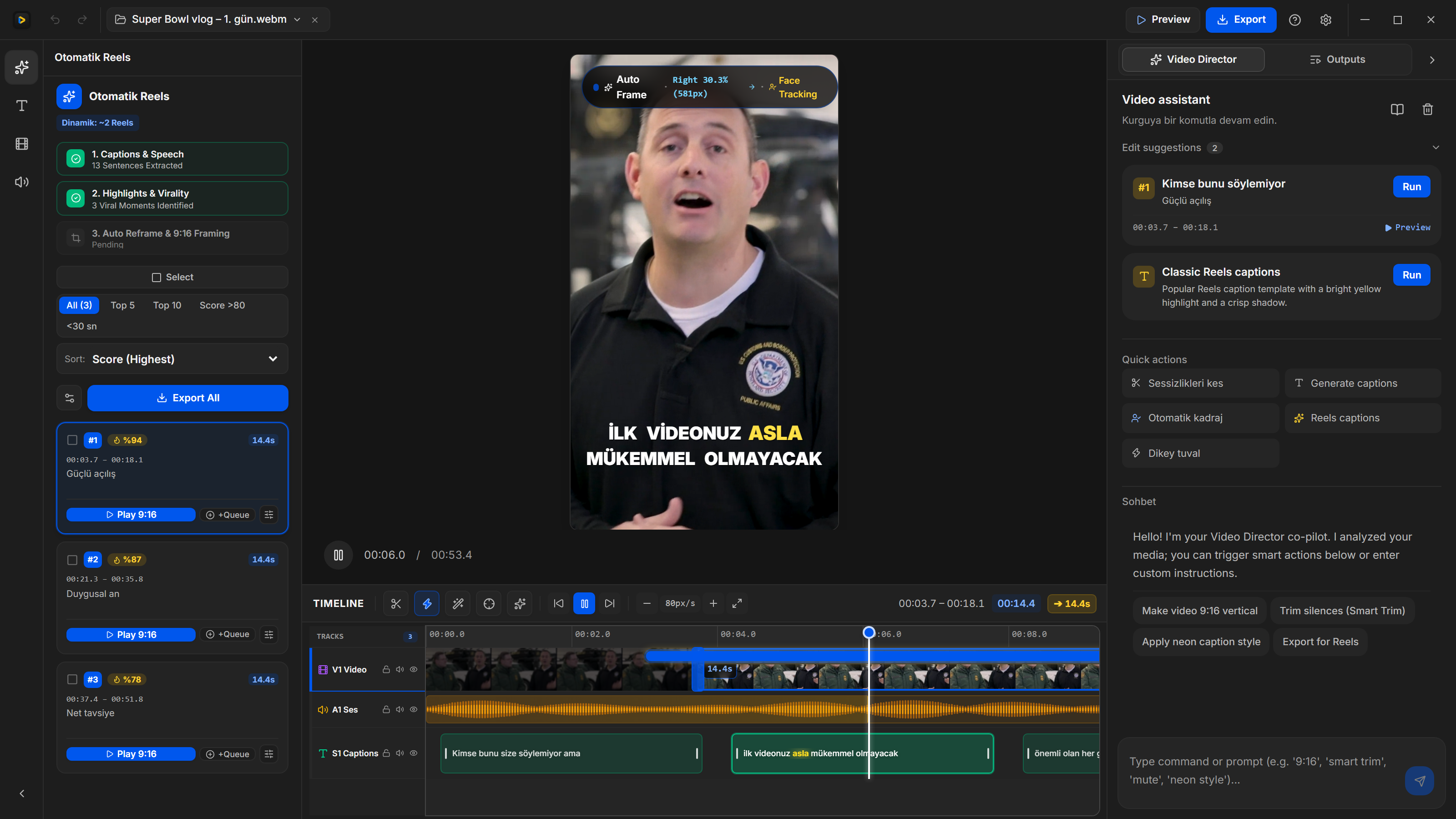
Inside the desktop app
One click turns a wide 16:9 vlog into a vertical 9:16 clip. Face tracking follows the speaker frame by frame, so nobody gets cropped out.
Features
Finds hooks, punchlines and quotable moments across hours of footage so you don't have to scrub the timeline.
Face tracking follows the speaker, so horizontal footage becomes a clean vertical clip without manual keyframes.
Speech is transcribed on your computer with Whisper and turned into styled captions. Most Shorts are watched muted — captions keep people watching.
Your GPU and CPU do the work. No queue, no upload time, no one else holding copies of unreleased content.
Plug in your own model key and pay the provider directly at cost — or add AI Cloud credits and skip setup.
Publish finished Shorts to your channel without leaving the app.
The same install, no window. Probe a file, cut a range, or render a folder of Shorts. Logs go to stderr. JSON comes back on stdout.
Usage, flags, and outputclipnugget probe episode.mp4
clipnugget auto episode.mp4 --count 5
clipnugget export episode.mp4 --start 12 --end 42Pricing
Every download starts with a 14-day Pro trial (or 5 exports, whichever comes first). When it ends nothing gets locked — you simply continue on Free.
$0 forever
The full editor, for as long as you like.
Launch price
$69$40 one-time
Everything in Free, unlocked with a license key.
First 15 licenses
Then $69, one-time. License key right after payment.
$5 / month
Optional. For people who don't want to manage an AI key.
AI Cloud
No charge today. Leave your email and we will tell you when the $5/month add-on opens.
Download
Windows, macOS & Linux · No account needed
FAQ
Yes. The Free tier has no time limit and no length limit. Exports carry a small watermark and top out at 1080p. Pro removes both and adds batch export.
Nothing breaks. Your projects stay, the editor stays, and you keep exporting on Free. Buy Pro whenever it's worth it to you.
No. Paste your own model API key in Settings and you pay the provider directly, usually cents per video. If you'd rather not deal with keys, AI Cloud is $5/month for 200 credits.
No. Cutting, reframing and rendering happen on your computer. Only the transcript text is sent to the AI model for highlight detection, and only when you run it.
Windows SmartScreen and macOS Gatekeeper flag new apps until enough people have installed them. On Windows click More info → Run anyway; on macOS right-click the app and choose Open.
No. Pro is a one-time purchase with a license key that works offline. AI Cloud is the only monthly option, and it's optional.
Open Find your license and use the email from the purchase. We send the active key to that inbox.
Yes. The installed app accepts probe, auto, and export and skips the window. Command line usage has the flags and the JSON it prints.
Both. Builds are available for Windows, macOS (Apple silicon) and Linux, and a Pro license works on all of them.